

AI Chatbot for Instant Customer Support
Provide instant AI-powered answers to customer questions anytime, improving engagement and reducing response times.
Support Customers Anytime with Faster Responses
PluginChatBot is the official AI chatbot plugin for WordPress and WooCommerce, powered by PluginChatBot. It lets you add an AI chatbot to your website, manage everything from your WordPress dashboard, answer visitor questions using your business knowledge, collect visitor details, save chat history, and send conversation copies to your team.
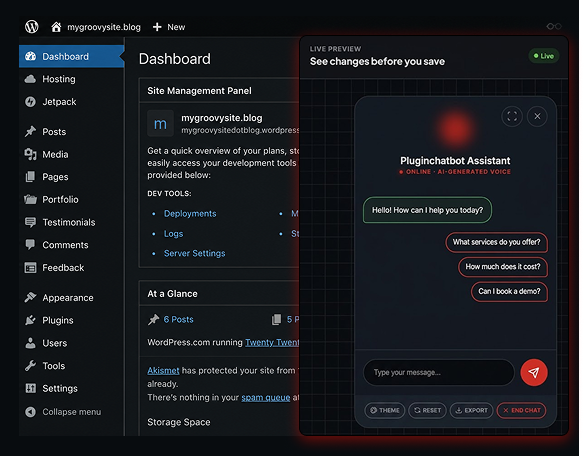








Follow our step-by-step video to install the PluginChatBot plugin, connect your chatbot, and have it answering visitors on your WordPress site.
Deliver Customisable Customer Support
Enhance your WordPress website with an AI chatbot that provides instant answers, improves customer support, and engages visitors 24/7. Connect your OpenAI API key, customise the chatbot, add your business knowledge, and manage everything directly from your WordPress dashboard.
Provide instant AI-powered answers to customer questions anytime, improving engagement and reducing response times.

Connect your OpenAI API key quickly for reliable, intelligent chatbot conversations.

Train your chatbot with business information to deliver accurate, personalised, and relevant customer responses.

Answer product, pricing, and booking enquiries instantly to increase customer confidence and conversion rates.

Manage chatbot settings, customise responses, and monitor performance directly from your WordPress dashboard.
Easy WordPress Setup
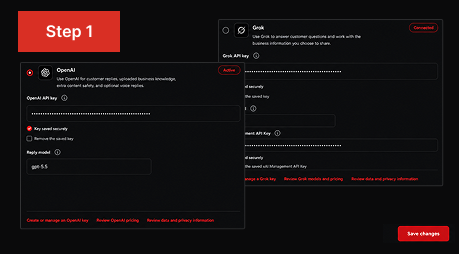
Install PluginChatBot, connect your OpenAI API key, and select your preferred AI model.
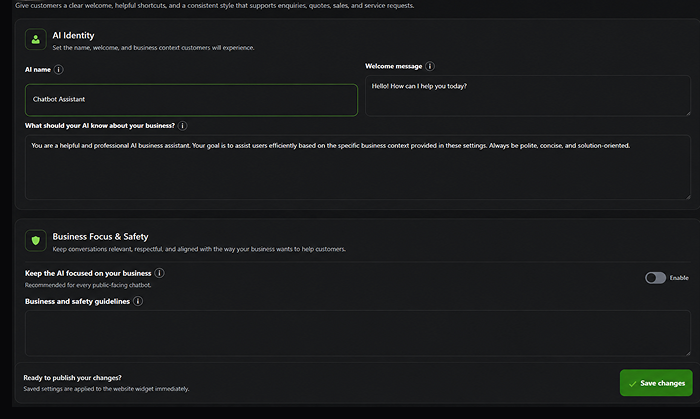
Set your AI name, create a welcome message, add business instructions, and personalise the chat widget design.
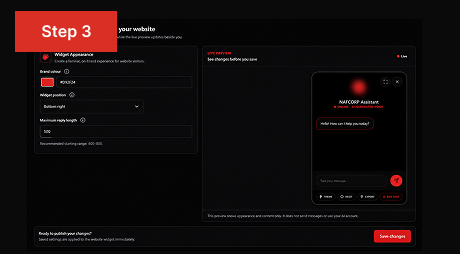
Upload your business knowledge, test the chatbot, and start delivering accurate AI-powered answers on your WordPress website.
Collect Visitor Details for Follow-Up
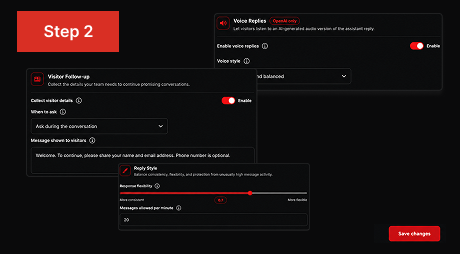
Capture visitor details during AI conversations, save complete chat history, and send conversation copies by email. Give your team the information they need to follow up with qualified leads, provide better support, and convert more website visitors into customers.
Collect names, emails, and phone numbers effortlessly.
Store every chat for accurate customer follow-ups.
Automatically email chat transcripts to your team.
Convert interested visitors into loyal customers faster.
Deliver personalised support using valuable conversation insights.
 Does PluginChatBot work with WordPress?
Yes. PluginChatBot is a WordPress plugin that lets you add an AI chatbot to your WordPress website, and it also works with WooCommerce stores.
 Do I need coding skills?
No. You can install PluginChatBot and set everything up from your WordPress dashboard without writing any code.
 Do I need an OpenAI API key?
Yes. Connect your own OpenAI API key so the chatbot can generate intelligent, up-to-date answers for your visitors.
 Can the chatbot answer from my business information?
Yes. Upload your business knowledge and instructions so the chatbot answers accurately using your own content.
 Can the chatbot collect visitor details?
Yes. The chatbot can capture names, emails, and phone numbers during conversations so you never miss a lead.
Can my team receive chat copies?Yes. Conversation copies can be emailed to your team automatically so everyone stays up to date on customer chats.
Who Can Benefit from PluginChatBot?

Answer visitor questions instantly, capture contact details, and turn more website enquiries into qualified leads with AI-powered conversations available 24/7.

Deliver smarter customer support and offer AI chatbot solutions as an added service, helping clients improve engagement, generate leads, and reduce support workloads.

Automate appointment bookings, answer common service questions, and collect customer enquiries around the clock so you never miss a potential customer.

Qualify prospects, answer frequent questions, and help visitors schedule consultations, so you spend more time serving clients and less time answering repetitive enquiries.

Guide shoppers with product recommendations, answer questions about pricing, shipping, returns, and availability, and help customers complete purchases with greater confidence.

Provide instant answers to common client questions, build trust through accurate AI responses, and capture valuable enquiries before visitors leave your website.


