
What Is a WordPress AI Chatbot?
A WordPress AI chatbot is a conversational assistant you add via a plugin. Visitors click the chat widget, ask questions in plain language, and get immediate, on‑brand answers powered by your business information (services, pricing, policies, FAQs). Unlike old “scripted” bots, modern AI chatbots understand many ways of asking the same question and can escalate to a human when needed.
10 Reasons to Add a Chatbot to Your WordPress Site
1. 24/7 Customer Support (Without Hiring More Staff)
Visitors browse early mornings, lunch breaks, and late nights. A chatbot answers common questions anytime: pricing, hours, delivery areas, bookings info, returns, and contact info.
2. Instant Answers to Repetitive Questions
“Do you deliver to my area?” “How much is this?” “What’s your return policy?” A chatbot handles these automatically so your team can focus on complex requests and qualified sales.
3. Capture More Leads (With Less Friction)
Many visitors won’t fill a long form, but they’ll start a quick chat. The bot can collect name, email, optional phone, and the original question, giving your team real context for follow‑up.
4. Answers Based on Your Business (Not Generic AI)
Train the bot with your services, pricing, FAQs, policies, and documents. This “business knowledge” layer makes responses accurate and relevant to your organisation.
5. Help Visitors Choose the Right Product or Service
Visitors can explain their needs conversationally (“Which package fits a small business?”). The bot guides them to the right page, product, or next step, reducing confusion and drop‑offs.
6. Boost WooCommerce Conversions
Shoppers ask about sizing, stock, delivery, payments, and returns. If help isn’t immediate, carts get abandoned. A chatbot reduces friction at the moment of purchase.
7. Manage Everything Inside WordPress
Look for a plugin with a simple dashboard: connect your AI provider, add business knowledge, set welcome messages and brand colours, preview the widget, and review conversations.
8. Better Follow‑Up Context for Your Team
Instead of “Hi, I’m interested,” your team sees the full conversation: what the visitor asked, what the bot answered, and where they got stuck. That means faster, more relevant replies.
9. On‑Brand Chat Experience
Customise the bot’s tone, name, greeting, shortcuts, colours, and position. A live preview ensures it feels like part of your site, not a random pop‑up.
10. Scale Support Without Scaling Repetition
As traffic grows, routine questions multiply. A chatbot handles many conversations at once with consistent answers, while humans step in for judgement‑heavy or sensitive cases.
How to Choose the Right WordPress Chatbot Plugin
Prioritise plugins that let you:
- Use your own business knowledge base
- Customise identity, tone, and appearance
- Capture visitor details with consent
- Store or disable conversation history (privacy control)
- Send conversation summaries to your team’s email or CRM
- Test responses before going live
- Clearly disclose how external AI services process data
Performance matters too: the best options load via async scripts and don’t hurt PageSpeed.
Simple 3‑Step Setup (No Code)
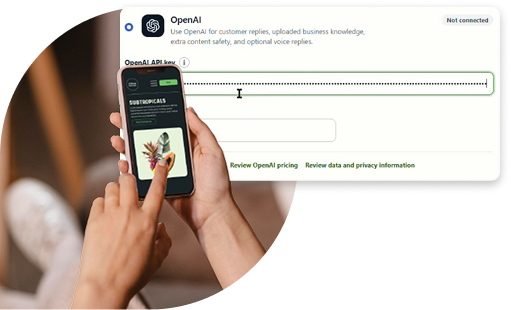
- Install and connect: Install your chosen plugin, activate it, and connect your AI provider (OpenAI).
- Customise the experience: Set the AI name, welcome message, brand colour, widget position, and conversation starters.
- Add knowledge and test: Upload your services, pricing, FAQs, and policies. Test varied customer questions and refine instructions until answers are clear and accurate.
After launch, review conversations periodically to spot gaps, confusing pages, and new topics to add to your knowledge base.
Quick FAQ
- Do I need coding skills? No. Leading plugins are designed for no‑code setup and management inside WordPress.
- Which AI model can I use? PluginChatBot connects to OpenAI, so you add your own OpenAI key and can choose or switch between OpenAI models later.
- Will it use my business info? Yes, when you add a knowledge base, the bot answers from your content, not just general AI knowledge.
- Can it collect contact details? Yes. You can enable optional lead capture (name, email, phone) with consent.
- Can my team get conversation copies? Yes. Configure email recipients or CRM integrations to receive summaries.
- Is conversation storage required? No. History is typically optional and can be disabled for privacy.
Why Choose PluginChatBot for WordPress?
PluginChatBot stands out because it’s built specifically for WordPress owners who want a simple, business‑friendly AI chatbot without juggling multiple external dashboards. Learn more about our WordPress AI chatbot plugin and what it includes.
- Native WordPress Dashboard (No External Portal Needed): All settings live inside WordPress: connect AI providers, manage business knowledge, customise the widget, preview changes, and review conversations from one place.
- Choice of OpenAI Models: You can connect your own OpenAI key and switch between OpenAI models as needed without reinstalling or reconfiguring your entire bot.
- Business Knowledge That Actually Reflects Your Company: Upload provider‑specific knowledge files and guidelines so answers are based on your services, pricing, policies, and FAQs, not just generic AI knowledge.
- Lead Capture Built In (With Consent): Optionally collect visitor name, email, and phone before or during chat, giving your team real context for follow‑up instead of vague “I’m interested” messages.
- Conversation History & Email Copies for Your Team: Store chats locally in WordPress (optional) and send completed transcripts to one or more team emails, so staff see exactly what the visitor asked and how the bot responded.
- On‑Brand Chat Widget With Live Preview: Customise AI name, welcome message, conversation starters, brand colour, widget position, reply length, and usage controls, with a live preview before you publish.
- Privacy‑Friendly Controls: Conversation storage is optional, rate limiting is adjustable, and you can disclose how external AI services process data, helping you align with privacy best practices.
- Advanced Options Without the Complexity: For OpenAI users, features like File Search, Code Interpreter, and optional voice replies (with an AI‑voice disclosure) are available as toggles, useful when you need them, hidden when you don’t.
- Built for Non‑Technical Teams: Guided setup, clear labels, and WordPress‑native management make it practical for business owners, marketers, and support teams, not just developers.
- Scales With Your Site: From a single service page to a multi‑location business or WooCommerce store, PluginChatBot can handle routine questions at scale while your team focuses on high‑value enquiries.