
Your Customers Don’t Always Visit During Business Hours
Imagine someone visiting your website at 10 PM. They’re interested in your services, but they have a few questions before making an enquiry. Your office is closed, and your team won’t be available until the following morning. Without immediate help, that visitor might leave without contacting you. An AI chatbot helps keep the conversation going.
It can answer common questions about your services, opening hours, pricing and policies using the information you’ve provided. For example, a visitor might ask:
- Do you offer weekend appointments?
- How much does your service cost?
- Do you deliver outside the city?
- Can I request a quote online?
Instead of waiting for someone to respond, they can get useful information straight away.
Why it matters: Your business can remain helpful outside normal working hours without requiring employees to be online around the clock.
Small Teams Spend Too Much Time Answering the Same Questions
Think about the questions your customers ask every day.
“What time do you close?”
“How much is delivery?”
“Do you offer refunds?”
“How can I book an appointment?”
These questions are important, but answering them repeatedly can take up a surprising amount of time. For small business owners, that time could be spent helping customers with more complicated needs, improving services or managing day-to-day operations.
An AI chatbot can handle many of these routine enquiries automatically. By using your website content, FAQs and business information, it can provide consistent answers to common questions. This doesn’t mean removing the human side of customer service. It means letting your team focus on conversations where their experience and personal attention matter most.
A Website Visitor Could Become Your Next Customer
Getting people to visit your website is only one part of growing a business. The next challenge is encouraging those visitors to take action.
Someone might be interested in your services but not quite ready to complete a contact form. They may want to ask a question first or understand which option is right for them. An AI chatbot creates an easier starting point. For example, imagine someone visiting a local cleaning company’s website.
- Visitor: “Do you offer end-of-lease cleaning?”
- Chatbot: “Yes, we offer end-of-lease cleaning services. Would you like information about what’s included or help requesting a quote?”
- Visitor: “I’d like a quote for a three-bedroom property.”
- Chatbot: “I can help you send an enquiry. Could you share your preferred contact details so our team can follow up?”
This simple conversation helps the visitor move from browsing to making an enquiry. With an appropriately configured lead capture feature, the business can collect useful information and follow up with a more relevant response. Not every chat will become a sale, but making it easier to ask questions can create more opportunities for meaningful customer conversations.
Customers Want Quick Answers, Not Complicated Websites
Even a well-designed website can sometimes leave visitors searching for information. They may need to open several pages to find a service description, delivery policy or booking information. An AI chatbot gives them another way to navigate your website. Instead of searching through menus, visitors can ask a question in their own words. For example:
- “Which service would suit my business?”
- “Where can I find your pricing?”
- “Do you offer support after installation?”
- “What’s the difference between these two packages?”
A properly trained chatbot can answer directly or guide visitors to the relevant page. This is particularly helpful for businesses with several services, product categories or pricing options.
The goal isn’t to replace good website design. It’s to make helpful information easier to access.
You Don’t Need a Big Budget or Technical Team to Get Started
A common concern among small business owners is that AI technology sounds complicated or expensive. The good news is that many modern website chatbot tools are designed for people without coding experience.
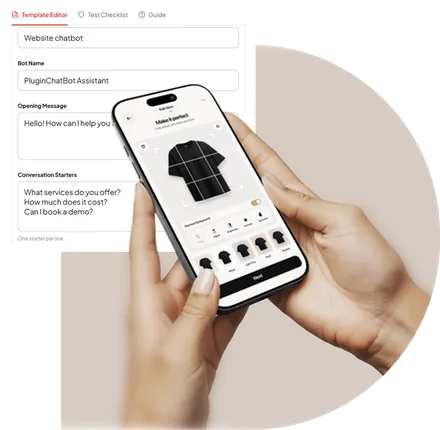
You can start with something simple, such as answering frequently asked questions or collecting customer enquiries. With a platform like PluginChatBot, businesses can create an AI chatbot, customise its appearance and train it using relevant website information.
PluginChatBot supports popular website platforms, including WordPress, WooCommerce, Shopify, Wix, Webflow and Squarespace. You can begin with a small knowledge base containing your most common customer questions, service information, opening hours and contact details.
As your business grows, you can improve the chatbot’s responses and explore additional features. Before choosing a plan, consider your expected message volume and the integrations you need.
Different Businesses Can Use AI Chatbots in Different Ways
One of the useful things about AI chatbots is that they aren’t limited to a single industry. The same technology can support different customer needs depending on the business.
- Online Stores: Customers often have questions about product details, delivery times, sizes or return policies. An AI chatbot can help shoppers find relevant information while they’re browsing, making the shopping experience more convenient.
- Local Service Businesses: Electricians, cleaning companies, repair services and other local businesses often receive enquiries about availability, service areas and pricing. A chatbot can explain available services and collect enquiry details for the team to review.
- Agencies and Consultants: Potential clients may want to understand your services before booking a meeting. A chatbot can explain what you offer, share relevant information and help visitors take the next step.
- Appointment-Based Businesses: Salons, wellness providers and other appointment-based businesses can use chatbots to explain services, opening hours and booking procedures. Where supported booking integrations are configured, a chatbot may also help guide customers through appointment requests. The important part is choosing a chatbot experience that matches what your customers actually need.
An AI Chatbot Should Support Your Team, Not Replace It
AI chatbots are useful, but they aren’t the answer to every customer question. Some situations need a real person. A customer might have a complicated complaint, a sensitive issue or a request that requires professional judgement. A good chatbot should recognise its limits.
If it doesn’t have enough information to answer accurately, it should avoid guessing and provide a clear way for the visitor to contact your team. For businesses using supported human handoff features, conversations can be transferred to a team member when necessary. This creates a more balanced customer experience. The chatbot handles straightforward enquiries, while your team remains available for situations that need personal attention. Customers get convenience without losing access to human support.
Getting Started Is Easier Than You Might Think
You don’t need to automate everything on your website from day one. In fact, starting small is often the better approach.
Step 1: Identify your most common questions
Look through customer emails, messages and phone enquiries. Write down the questions you answer most frequently.
Step 2: Prepare your business information
Gather accurate service descriptions, pricing, opening hours, policies and contact details.
Step 3: Choose an AI chatbot platform
Look for something that works with your website, supports your business goals and is manageable for your team.
Step 4: Customise the experience
Add a friendly welcome message, choose your brand colours and explain what the chatbot can help with.
Step 5: Test before publishing
Ask the chatbot the same questions your customers would ask. Check its answers, links and lead capture process.
Step 6: Keep improving
Review conversations, update outdated information and make adjustments based on real customer needs.
A chatbot becomes more useful when you continue improving the information and instructions behind it.
Is an AI Chatbot Worth It for a Small Business?
That depends on how your website is used and what your customers need. If your website receives regular enquiries, your team spends time answering repetitive questions or visitors often need help choosing services, an AI chatbot may be worth exploring.
It can be especially useful when:
- Your business receives enquiries outside working hours.
- Customers regularly ask similar questions.
- You want to make contacting your business easier.
- Your team has limited time for routine support.
- You want a more interactive website experience.
However, a chatbot is not a shortcut to guaranteed sales. Its effectiveness depends on your website traffic, the quality of its answers, how well it fits your customers’ needs and whether your team follows up on enquiries.
Start with one clear goal and measure the results before expanding.
Give Your Small Business Website a More Helpful Experience
In 2026, having a website is important, but making that website genuinely useful is what helps create better customer experiences. Visitors want clear information, convenient communication and an easy way to contact your business.
An AI chatbot can help provide those things without adding more routine work to your team’s day. Whether you run an online store, local service business or growing agency, the right chatbot can help you answer questions, collect enquiries and make your website more welcoming.
And you don’t need to do everything at once. Start with the questions your customers already ask, make sure your chatbot provides accurate information and improve the experience over time.
Make Your Website Work Smarter with PluginChatBot
PluginChatBot helps small businesses add an AI-powered chatbot to their website without complicated development. Answer common questions, capture customer enquiries and create a more helpful experience for visitors, even outside business hours.
Ready to see how it works? Start Your 14-Day Free Trial