
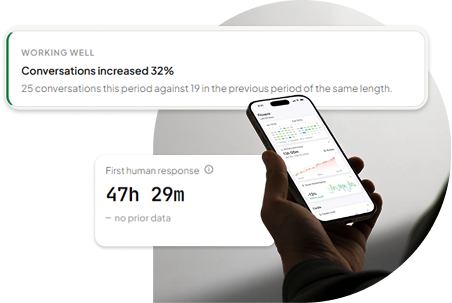
Conversation Volume
Conversation volume is the number of conversations your chatbot handles over a given period. It’s the most basic metric to track, and it tells you how much your chatbot is being used, but it doesn’t tell you whether that usage is valuable. A high volume of conversations doesn’t automatically mean success. Ten thousand poor conversations are worth far less than two thousand helpful ones.
How to Use This Metric
Track conversation volume over time so you can spot trends and compare periods:
- Daily conversations
- Weekly conversations
- Monthly conversations
- Conversations by page
- Conversations by traffic source
Unique Visitors
Conversation volume and unique visitors aren’t the same thing. One thousand conversations could mean one thousand different people spoke to your chatbot, or it could mean a much smaller group of visitors returned several times. Tracking unique visitors tells you how much reach your chatbot actually has. Comparing unique visitors with total conversation volume also shows you how often people return to chat again, which is a useful signal of ongoing engagement.
AI Containment Rate
AI containment rate is the share of conversations your chatbot resolves without needing a human. For example, if one hundred conversations start and the AI handles eighty of them fully on its own, your containment rate is 80%. A higher containment rate generally reduces repetitive work for your team, but a very high containment rate isn’t always the goal on its own. Customers should always have an easy path to a human when they need one, so containment should be read alongside handoff and resolution metrics rather than in isolation.
How to Improve AI Containment
Review the conversations that needed human help and look for patterns such as:
- Missing information
- Questions the chatbot doesn’t understand
- Poor answers
- Complex conversation flows
- Requests that should be handled by a person
Resolution Rate
Resolution rate measures how often a customer’s question actually reaches a successful outcome, whether that’s resolved by the AI directly or by a human after a handoff. This is different from containment because a conversation can be handed off to a person and still count as resolved. Resolution rate gives you a clearer picture of whether customers are genuinely getting the help they came for.
How to Improve Resolution Rate
Review unresolved conversations and ask:
- Did the chatbot misunderstand the question?
- Was important information missing?
- Was the answer unclear?
- Did the customer need a human?
- Was the conversation too complicated?
Human Handoff Rate
Human handoff rate tells you how often conversations are transferred to a person on your team. A high handoff rate may point to weak business information or gaps in your chatbot’s knowledge base. But a low handoff rate isn’t automatically better either, customers must always be able to reach a human when they genuinely need one. See how live chat handoff keeps that path open. The goal is to understand why handoffs happen, not simply to reduce the number at any cost.
Look at Handoff Reasons
- Customer requests a human
- Chatbot does not understand the question
- The issue is too complex
- The chatbot lacks information
- A sales conversation requires personal assistance
If the same question keeps causing handoffs, that’s a clear sign you should add that information to your chatbot’s knowledge base.
Lead Conversion Rate
Lead conversion rate is the percentage of conversations that turn into a lead or enquiry. For example, if one thousand visitors chat with your bot and one hundred of them share their details or ask to be contacted, that’s a 10% lead conversion rate. This is one of the most valuable metrics for businesses using their chatbot for lead generation, since it connects chatbot activity directly to business outcomes.
Measure Lead Quality
Not all leads are equal, so it’s worth tracking how many conversations go on to:
- Request a quote
- Contact your sales team
- Request a demo
- Become sales opportunities
- Make a purchase
- Become customers
Conversion Rate by Website Page
Visitors on different pages have different intent. Someone chatting from your pricing page is usually closer to a decision than someone reading a blog post. Tracking conversions by page helps you see where your chatbot is performing best. Product, service, pricing, and landing pages often generate more leads than informational pages. Once you know which pages convert well, you can improve the chatbot’s placement and opening messages on the pages that matter most.
Average Response Time
Speed matters to customers, so it’s worth tracking both how fast your AI replies and how fast a human responds once a conversation has been handed off. A slow response, at either stage, increases the chance a visitor leaves before getting the help they need. That said, speed must never come at the cost of accuracy, a fast but wrong answer is worse than a slightly slower correct one.
Most Frequently Asked Questions
Reviewing the questions your chatbot is asked most often reveals what your customers actually care about, commonly around:
- Pricing
- Products
- Features
- Shipping
- Returns
- Availability
- Setup
- Integrations
- Support
Use this information to improve both your chatbot and your website. If customers keep asking your chatbot about pricing, for example, that may be a sign your pricing page is hard to find.
Low-Confidence Answers
A low-confidence answer is one where the chatbot isn’t sure how to respond. These moments usually point to a gap in your knowledge base, for example, a question like “Do you support international customers?” that your business information simply doesn’t cover yet.
How to Improve
Regularly review low-confidence questions, group them by topic, and update your knowledge base to close the gaps you find.
Customer Sentiment
Customer sentiment reflects how visitors feel during a conversation, not just whether it was resolved. Watch for signs such as:
- Frustration
- Confusion
- Negative feedback
- Complaints
- Requests for human support
If negative sentiment starts rising, review the conversations behind it and fix the underlying issue before it affects more customers.
Answer Quality
A fast answer that’s wrong is still a bad answer. Regularly check the quality of responses your chatbot gives about:
- Products and services
- Pricing
- Policies
- Features
- Contact information
Focus your review on conversations that received negative feedback or ended in a handoff, they’re the fastest way to find where answer quality is falling short.
Conversion Funnel and Drop-Off Rate
Mapping your chatbot’s conversion funnel helps you see the full journey: Chat Opened → Conversation Started → Lead Captured → Resolved or Handed Off. Looking at where visitors drop off along this funnel tells you where to focus your improvements. If people are leaving right when they’re asked for contact details, for example, that usually means you’re asking too early in the conversation.
How to Reduce Drop-Off
Keep the conversation simple, ask only for information you genuinely need, and make sure the chatbot provides useful answers before asking for anything in return.
AI Cost and Efficiency
It’s worth tracking your AI usage and estimated cost, and comparing it against the value it’s creating, such as:
- Leads generated
- Conversations resolved
- Support workload reduced
- Sales influenced
Looking at cost alongside these outcomes gives you a much clearer picture of your chatbot’s overall value than looking at cost alone.
Performance Over Time
Don’t judge your chatbot’s performance based on a single day or a single week. Review metrics on a regular cadence instead:
- Weekly: conversations, unanswered questions, common issues
- Monthly: leads, resolution rate, AI containment, handoffs, sentiment, conversions
- Quarterly: overall business impact, customer experience, sales contribution, costs, ROI
How PluginChatBot Helps You Track Chatbot Performance
PluginChatBot provides an analytics dashboard built to make these metrics easy to follow. From one place, you can track:
- Conversations
- Unique visitors
- Leads and conversion rate
- AI containment
- Human handoffs
- Human response time
- Estimated AI cost
You can also review conversation trends, common questions, low-confidence answers, customer sentiment, and handoff reasons, giving you a complete view of how your chatbot is actually performing, not just how many conversations it’s having. If you’re just getting started, it helps to first understand how a website chatbot generates more leads and how AI chatbots improve customer experience, so you know which metrics matter most for your goals.
Measuring performance helps you see what’s actually working and what needs attention. Don’t focus on a single number in isolation, review your metrics regularly, learn from real conversations, and keep improving. With the right approach, your chatbot becomes part of your customer service, lead generation, and sales strategy, not just a widget on your website.
Ready to improve your chatbot performance? Explore PluginChatBot and see how AI-powered conversations and analytics help you engage visitors, capture leads and make better decisions.