
Why Managing Multiple Customer Communication Channels Is Challenging
Customers expect businesses to be easy to contact, whether they're browsing a website, scrolling through Instagram or using their favourite messaging app. But every additional communication channel creates another place your team needs to monitor.
For example, a small online retailer might receive product questions through Instagram, order enquiries through WhatsApp and delivery questions through its website chatbot. Without an organised system, responding to everyone becomes difficult.
Some of the biggest challenges include:
- Keeping track of conversations across different platforms.
- Responding quickly during busy periods.
- Remembering what customers have already discussed.
- Maintaining consistent information across channels.
- Following up with potential customers.
These challenges can affect both customer satisfaction and your team's productivity.
1. Missing Customer Messages Across Different Platforms
Imagine receiving ten messages on Instagram, five through WhatsApp and several more from your website. When you're busy managing daily operations, it's easy to overlook a notification.
Unfortunately, the customer waiting for a response doesn't know how many other conversations you're handling. They simply want an answer.
How to Solve It
Start by bringing supported customer conversations into a more organised workflow. Instead of checking every platform separately, use connected messaging tools to make enquiries easier to monitor.
PluginChatBot supports integrations that help businesses manage website conversations alongside connected messaging channels.
This makes it easier to keep track of customer enquiries and reduce the risk of messages being overlooked.
2. Switching Between Multiple Apps Takes Too Much Time
Opening Instagram, checking Messenger, moving to WhatsApp and returning to your website chat might seem manageable at first.
But when dozens of messages arrive throughout the day, constantly switching platforms becomes distracting. Your team spends more time navigating apps and less time helping customers.
How to Solve It
Use a centralised customer communication workflow wherever your messaging integrations support it.
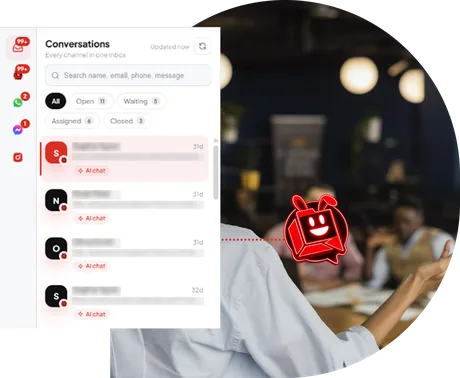
For example, PluginChatBot allows businesses to manage connected Facebook Messenger and Instagram conversations alongside website chats through its inbox.
This helps teams review customer enquiries without repeatedly switching between those platforms.
For businesses managing several channels, reducing unnecessary app switching can make everyday customer support more manageable.
3. Customers Have to Repeat Their Questions
Have you ever explained a problem to a business, only to be asked to explain everything again when someone else responds? It's frustrating.
The same issue can happen when customers move between different communication channels. A visitor might ask about a service through your website, then contact your business on Messenger later. If the team doesn't have the relevant conversation details, the customer may need to start again.
How to Solve It
Keep available conversation history and customer information accessible to the people handling enquiries. When previous messages are visible, team members can understand the situation before replying. PluginChatBot's supported conversation management features help businesses retain context within connected workflows.
For customers, this means less repetition and a smoother support experience.
4. Responding Quickly Becomes Difficult During Busy Hours
Some days, customer enquiries arrive faster than your team can answer them. An online store might receive multiple product questions during a promotion. A service business could receive several quote requests while staff are attending appointments.
Trying to respond to every message manually can create delays.
How to Solve It
Use AI-powered assistance to handle common questions before they require staff attention.
A well-trained website chatbot can help answer questions about:
- Products and services.
- Opening hours and locations.
- Pricing information.
- Booking and enquiry processes.
- Delivery and return policies.
This allows customers to find information while your team focuses on conversations that need personal assistance.
PluginChatBot provides AI-powered website support that can answer common enquiries 24/7 using your business information.
5. Providing Consistent Answers Across Every Channel
Imagine a customer asking about your delivery policy on Instagram and receiving one answer, while another customer gets different information through your website. Even small inconsistencies can create confusion.
When several people manage different communication channels, keeping information accurate becomes more challenging.
How to Solve It
Maintain one reliable source of business information. Keep your service descriptions, FAQs, policies and operating hours updated. When using an AI chatbot, train it with accurate information from your website and supported knowledge-base documents.
PluginChatBot allows businesses to customise chatbot knowledge and instructions so AI responses reflect their services and policies. Your team should also use the same approved information when responding manually on other channels.
6. Losing Potential Leads in Everyday Conversations
Not every customer enquiry is a support request. Someone asking about your services might be interested in booking an appointment, requesting a quotation or purchasing a product.
But when these conversations are spread across several platforms, valuable opportunities can be difficult to track. For example, a customer might ask about website development on Facebook Messenger, share their requirements and then wait for a callback. If their details aren't recorded properly, the enquiry could be forgotten.
How to Solve It
Create a clear process for capturing and managing potential leads.
Collect relevant information, such as the customer's name, contact details and enquiry requirements, with appropriate notice and consent where needed.
PluginChatBot supports lead capture and HubSpot CRM integration, allowing configured customer enquiry information to move into a CRM for follow-up.
This helps businesses organise potential opportunities rather than relying on scattered messages.
7. Knowing When AI Should Hand Over to a Human
AI chatbots can answer many routine questions, but not every customer situation can be resolved automatically.
Some visitors need personalised advice, a complex quotation or help with a sensitive issue.
If customers cannot reach a real person when necessary, their experience may become frustrating.
How to Solve It
Use AI assistance for straightforward questions while providing a clear path to human support.
For example:
Customer: "Can you help me with a custom website project?"
AI Chatbot: "I can share information about our website development services. Would you like to tell me more about your project or speak with our team?"
This gives customers a useful starting point without pretending the chatbot can handle every requirement.
PluginChatBot supports human handoff with appropriate configurations, allowing businesses to combine automated assistance with personal support.
How PluginChatBot Helps Businesses Manage Multiple Communication Channels
Managing customer enquiries becomes easier when your website chatbot, messaging platforms and lead management tools work together.
PluginChatBot helps businesses create a more connected customer communication experience.
With supported integrations and configurations, businesses can:
- Connect website chat with messaging channels: Support conversations through your website and connected WhatsApp Business, Messenger and Instagram workflows.
- Manage social enquiries centrally: Review connected Messenger and Instagram conversations alongside website chats.
- Answer common questions with AI: Help website visitors find information without waiting for a manual response.
- Maintain conversation context: Keep relevant message history available within supported conversations.
- Capture and organise leads: Collect customer enquiries and connect captured information with HubSpot CRM.
- Offer human assistance: Let customers request help from your team when a conversation needs personal attention.
Available capabilities depend on your PluginChatBot plan, enabled integrations and channel requirements.
The aim isn't to remove human interaction. It's to make communication easier for customers and more manageable for your team.
5 Practical Tips for Managing Multiple Customer Channels
Even with AI and integrations, a good customer communication process matters.
1. Keep your business information updated. Make sure your team and chatbot use accurate information about your products, services and policies.
2. Set clear response expectations. Let customers know when they can expect a human reply, especially outside business hours.
3. Review customer conversations regularly. Identify repeated questions, unanswered enquiries and opportunities to improve support.
4. Give customers a clear next step. Whether someone wants a quote, product information or human assistance, make it easy to continue.
5. Test your connected channels. Check that messages arrive in the correct inbox, relevant context is available and handoff processes work as intended.
Small improvements to your communication workflow can make a meaningful difference as your business grows.
Final Thoughts: More Channels Shouldn't Mean More Confusion
Customers want the freedom to contact businesses through the platforms they already use. For businesses, supporting multiple channels creates opportunities to connect with more people, but it also introduces new responsibilities.
Missed messages, slow responses and disconnected conversations can make customer support harder than it needs to be. By combining AI-powered assistance, connected messaging channels and organised lead management, businesses can create a more consistent customer experience.
The goal isn't to be everywhere at once. It's to make every customer conversation easier to manage, no matter where it begins.
Make Customer Conversations Easier With PluginChatBot
Stop letting customer enquiries get lost between your website and messaging platforms. With PluginChatBot, you can build an AI-powered website chatbot, connect supported communication channels and organise customer enquiries more effectively.
Start your 14-day free trial and discover a smarter way to manage customer conversations.